AI Conversation Summaries automatically generate a concise recap of completed customer conversations, helping you quickly understand what was discussed without reading the entire conversation.
Whether you’re reviewing yesterday’s conversations, handing off work to another team member, or jumping back into a customer interaction after some time has passed, AI Conversation Summaries provide an easy way to get caught up in seconds.
How it Works
When an eligible SMS conversation is marked Completed, Captivated automatically generates an AI-powered summary and attaches it to the conversation.
The summary highlights the key details of the interaction, making it easier for your team to review past conversations and continue helping customers.
AI Conversation Summaries are generated automatically—there’s nothing you need to do after completing the conversation.
When is a Summary Created?
A summary is generated when:
AI Conversation Summaries are enabled for your account.
The conversation occurs on an SMS channel with Conversation Summaries enabled.
The conversation is marked Completed.
The conversation contains enough information to generate a meaningful summary.
Some conversations won’t receive a summary.
Examples include:
Group conversations
Conversations without enough content to summarize
Conversations where a summary could not be generated successfully
These conversations are not counted toward your usage.
Why Use AI Conversation Summaries
AI Conversation Summaries can help your team:
Understand customer conversations at a glance
Reduce time spent reading long message threads
Make team handoffs easier
Review completed conversations more efficiently
Quickly catch up after time away
AI Summary Usage
AI Conversation Summaries are a usage-based feature.
Every successfully generated summary counts toward your account’s AI Summary usage.
To view your current usage (must be a Captivated admin):
Click the Settings (gear) icon.
Select Account Usage.
There you’ll find:
AI Summaries used this billing period
Your included allowance
Your current billing period
Usage alongside Messages, Voice Minutes, Phone Lookups, and Video Minutes
The usage shown in Account Usage always matches the usage used for billing.
When does usage update?
Account Usage refreshes automatically once each day.
If you recently generated a summary, it may not appear until the next refresh.
If you need an updated count sooner, contact the Captivated Support team.
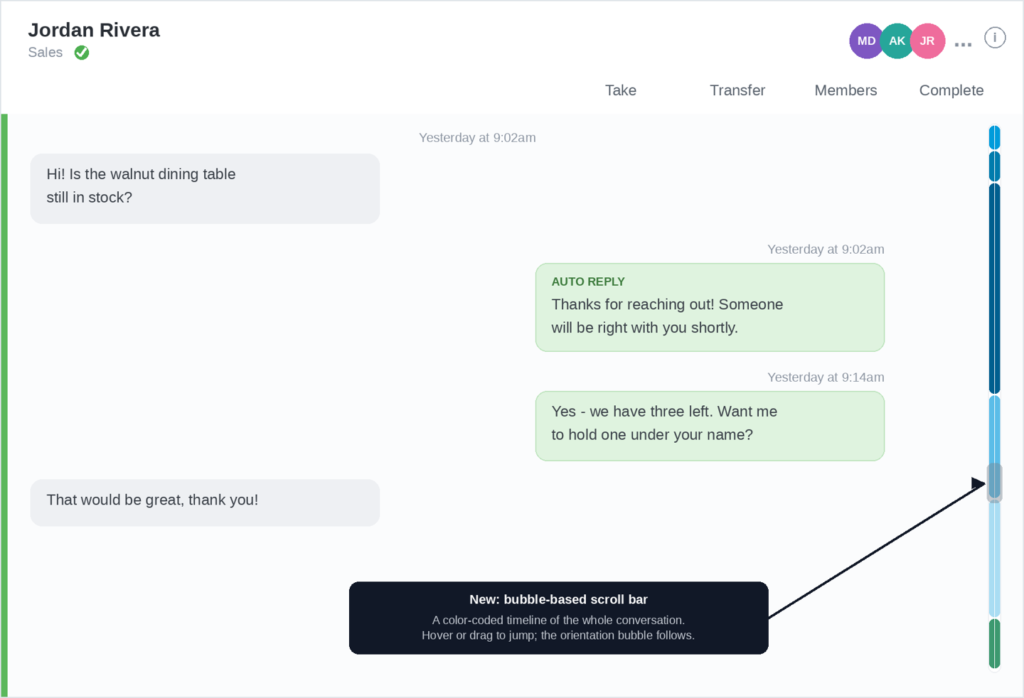
Bubble-based Scrolling
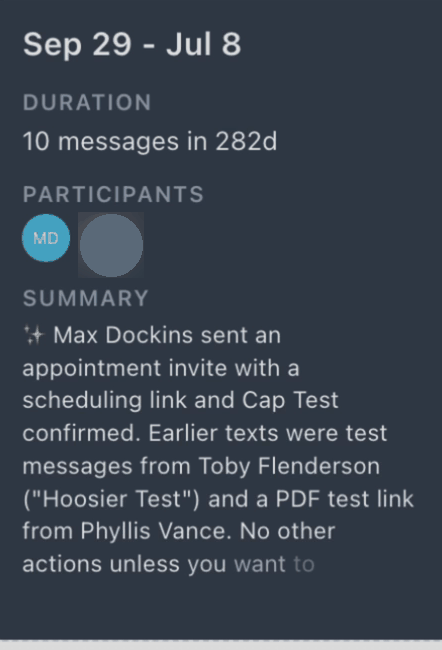
Long conversations can be hard to navigate. As you scroll back through a conversation, Captivated shows a small bubble that tells you where you are in the thread — the dates you’re looking at, how many messages happened over that time, and who’s involved — so you can find what you need without reading every message.
What the bubble shows
The date range of the messages you’re scrolled to.
How many messages happened over that time.
The participants in the conversation.
A short AI Summary of the conversation — a plain-language recap of what happened. AI Summaries is a paid, premium add-on; if your account doesn’t have it, you’ll still see the dates, message count, and participants.
How to use it
Just open a conversation and scroll up through its history. The bubble appears automatically as you scroll and updates to match the part of the conversation you’re viewing. There’s nothing to turn on and nothing to click — it’s simply there to help you get your bearings.
The AI recap is part of the AI Summaries add-on, a paid feature. Without it you’ll still see the date range, message count, and participants. Contact the Captivated team to add AI Summaries.
Account Usage refreshes once a day (overnight), so a new summary may not appear immediately. If you need an updated count sooner, contact the Captivated team and we can refresh it for you.